Get started
Build a working MCP server with Dockyard in five minutes.
1. Install the CLI
Dockyard ships one binary, dockyard. The recommended path is one command:
go install github.com/hurtener/dockyard/cmd/dockyard@latest
export PATH="$(go env GOPATH)/bin:$PATH"   # if it isn't already
dockyard --help
go install resolves the tag against the Go module proxy and produces a working dockyard binary at $(go env GOPATH)/bin/dockyard — the same CGo-free artifact the release pipeline cross-compiles for darwin, linux, and windows × amd64 and arm64. Verify the binary's .sha256 checksum against the Releases page if your environment needs it.
Alternative: build from source
For hacking on Dockyard itself, or to run against main:
git clone https://github.com/hurtener/dockyard
cd dockyard
make build           # produces bin/dockyard (CGo-free static)
export PATH="$PWD/bin:$PATH"
dockyard --help
2. Pick a path
You have two options.
a) Scaffold a blank server
dockyard new my-server
cd my-server
go test ./...        # the scaffolded contract test passes
go run .             # serves over stdio
dockyard new resolves dependencies and generates the contract artifacts for you, so the project builds, tests, and validates immediately. (Pass --no-postgen to skip that and run go mod tidy + dockyard generate yourself — handy for hermetic or air-gapped environments.)
This is the first-class path — one manifest, one example contract-first tool (greet), generated artifacts, a runnable main.go. No UI; add one later with attach-a-ui-resource.
Want a working tasks/* surface from the first run? Pass --example-task-support required (or optional): the scaffold both declares the example tool that way in the manifest AND emits an engine-wired main.go that constructs a real tasks.NewInMemoryStore() + tasks.NewEngine(...) and attaches it via server.Options{Tasks: engine} — no hand edit required. See the agent skills index for the scaffold-a-server skill that documents the full flag set.
b) Scaffold a template
The two shipped templates exercise the framework end-to-end:
- analytics-widgets — three widget tools rendered inline by a Svelte App. The read-side example. Walkthrough →
- approval-flows — two task-augmented tools driving a human-in-the-loop round-trip from inside an iframe. The write-side example. Walkthrough →
dockyard new my-widgets --template analytics-widgets
cd my-widgets
If you installed Dockyard via go install …@latest, dockyard new resolves dependencies against the published module — no extra flag.
If you built from source, add --dockyard-path /path/to/dockyard to the dockyard new invocation: the flag wires the local Dockyard checkout into the generated go.mod and web/package.json (decision D-080).
A template ships a Svelte UI — set it up before the dev loop
Unlike the blank server, a template has a web/ UI that must be installed and built once before step 3. Skip this and dockyard dev fails with vite: command not found and open web/dist/index.html: file does not exist:
(cd web && npm install)   # install the web deps (provides Vite)
dockyard build            # build once so the embedded bundle (web/dist) exists
Then dockyard dev (step 3) runs and auto-attaches the inspector. The analytics-widgets and approval-flows walkthroughs spell this out end to end.
3. Run the dev loop
dockyard devOne process supervises the Go server, regenerates contracts on a change under internal/contracts/, and runs Vite for the Svelte UI. Edit a contract, save — the types are live before the server restarts. Ctrl-C tears the whole tree down cleanly. See the Dev loop guide.
4. Inspect
In another terminal, attach the inspector:
# Start the server on HTTP so the inspector can attach
dockyard run --transport http

# Then in a third terminal:
dockyard inspect --url http://127.0.0.1:8080
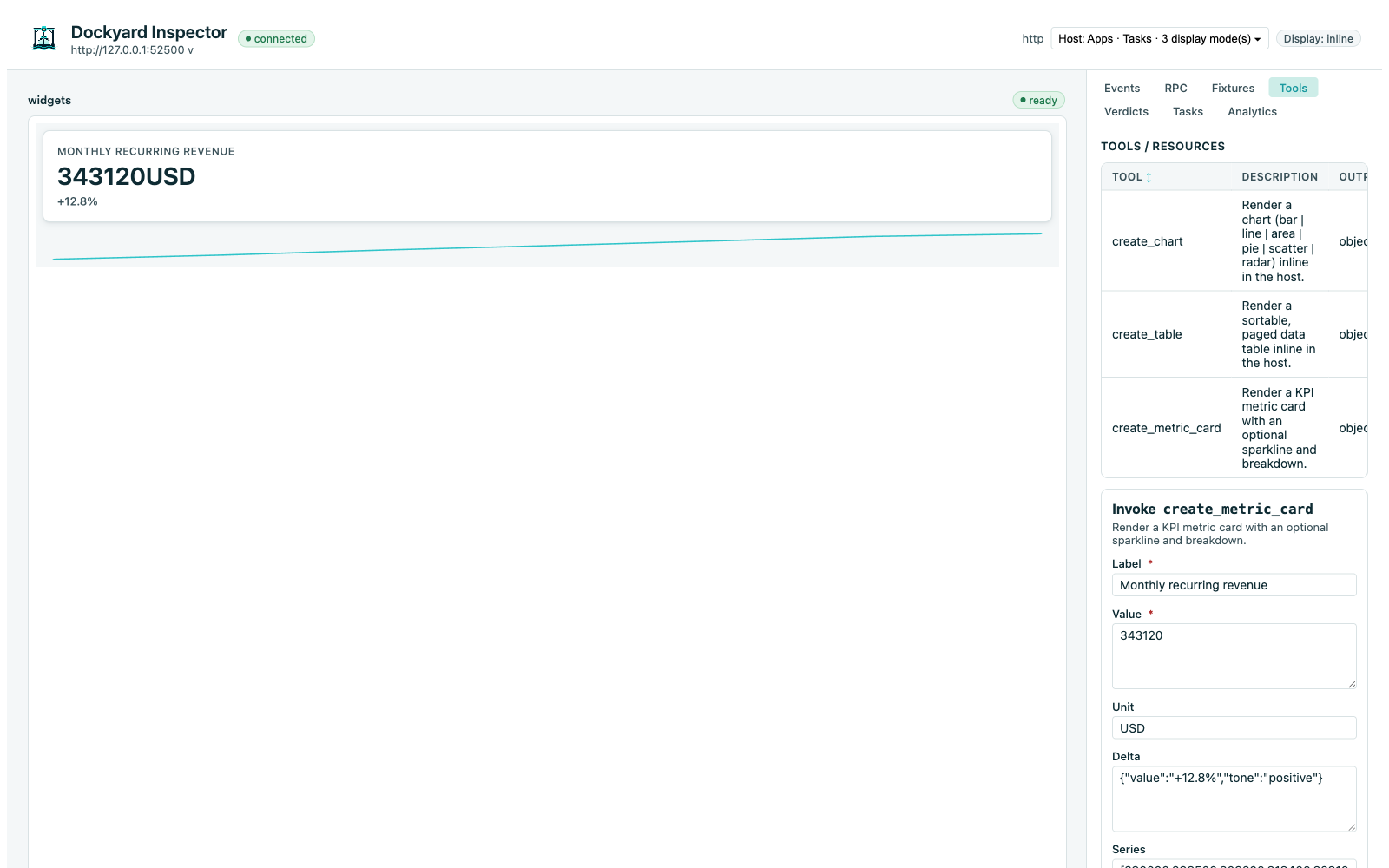
The inspector is dev-mode-gated, localhost-only, and operator-initiated only (RFC §12; D-144). It renders your App in a sandboxed iframe, shows the live Logbook stream, lets you fire tools by hand, and switches fixtures across the six UI states (happy, empty, error, permission, slow, large). See the Inspector guide.
5. Validate
Before pushing or shipping:
dockyard validate    # build blockers (fast)
dockyard test        # the full contract + compliance + capability gate
A blocker exits non-zero with an actionable diagnostic. See the Validate + test guide.
6. Package and install
dockyard build                              # one CGo-free static binary with the UI embedded
dockyard build --cross-compile              # darwin/linux/windows × amd64/arm64 with SHA-256 sidecars
dockyard install claude                     # write the host's MCP config; verify a real handshake
See the Packaging + install guide.
Next steps
- Contracts (Design A) — define and evolve tool contracts the contract-first way.
- UI resources (MCP Apps) — attach a Svelte App to a tool.
- Agent Skills index — what an AI coding agent reads to build with Dockyard end-to-end.